Global filters
You can turn on a global filter(s) to stay focused on any subset of the data as you use different dashboards. When you open another dashboard, applicable global filter(s) (see below) will remain locked on.
The filter panel lists global filters in addition to the dashboard's filters.
|
To turn on a global filter |
|
|
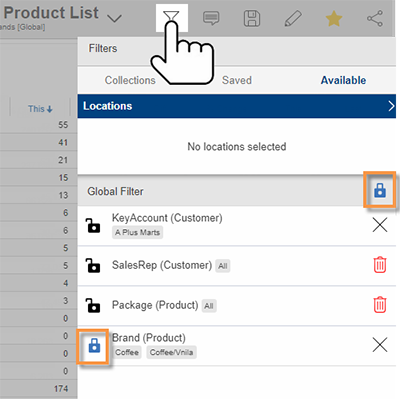
In the Filters panel, tap the To lock/unlock all the dashboard's filters at once, tap the |
|
 icon to turn on the filter globally (i.e., lock on
  ).
). 
When you open another dashboard
A global filter will stay on if any of the following are true:
-
The filter's dimension is a "group by" in the dashboard.
-
The dashboard has a dashboard filter for the dimension.
-
The filter is based on a collection.
The global filter must also have at least one member selected (i.e., not "All") to remain on.
Tip: You may receive a prompt to apply global filters when you open another dashboard. The prompt can be turned on or off in settings.
Clear global filters
|
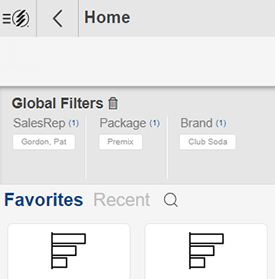
The home screen shows the current set of global filters. You can tap the |
|
 icon to clear all global filters.