Settings
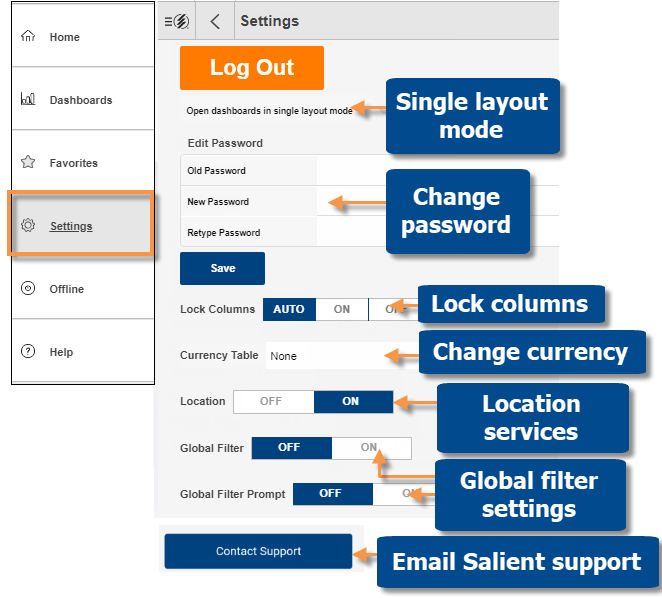
The settings screen (accessed through the main menu) provides customization options. You can also log out or contact support from this area.
|
Setting |
Explanation |
|
Single layout mode |
This option is only used if the dashboard has a layout that has been created in the mobile app and the browser-based layouts (desktop/tablet and phone) are turned off for mobile. In this case, you can turn on the checkmark to open a dashboard to a single, maximized pane rather than using its mobile layout. Tap "Save" after changing this setting. |
|
Password |
Tap "Save" after changing your password. This also affects browser-based dashboards. |
|
Lock columns |
Control whether or not the name column is locked in place as you scroll. |
|
Currency table |
Select the currency. Options must be configured by your administrator. |
|
Location |
Enable/disable the nearby location feature (additional setup). |
|
Global filter settings |
Turn on/off global filtering. Turning global filters off will clear all global filters. Turn off the prompt to automatically apply current global filters when you open a dashboard. Or turn the prompt on to receive a prompt before applying global filters. |
|
Contact Support |
Email log files to Salient support for troubleshooting. When prompted, you must allow Salient to access photos and media to enable this feature. To email via Microsoft Outlook instead of the device's default email app, the Microsoft Office Outlook Desktop Integration app must be installed. On Windows, the support email address may not populate automatically; in this case, enter support@salient.com. |